Specify a record to be used to preview the output of Standards module Term Definition or Field Definition records.1
 Description
The Standards module gives institutions the autonomy and flexibility to maintain a range of industry standards such as Darwin Core or Audubon Core for data sharing purposes; by pairing EMu fields with individual terms from a standard, institutions are able to export their EMu data compliant with that standard.
Two types of definition can be specified in the Standards module, Term Definition and Field Definition2:
Term Definition
When defining a term on the Term tab3 in the Standards module we associate the term with one or more EMu fields and define how the EMu data is formatted when it is output. Two formatting methods are available from the Format Specifier drop list (these are mutually exclusive):
- String - The formatting information specified in Term Format String will be used.
- Script - The formatting specified in a perl subroutine on the Script tab will be used.
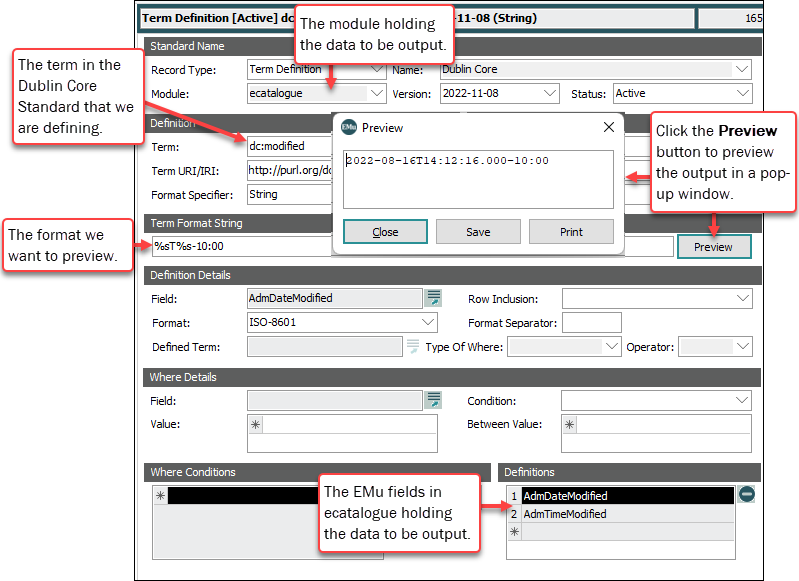
With the Preview Record Registry entry a Preview button is enabled beside the Term Format String field and on the Script tab. The button can be used to preview a Term Definition as it is created to ensure the output matches what is expected.
The Preview Record Registry entry points to a record in the module from which data will be output for the standard (ecatalogue for instance).
When the Preview button is clicked, data from the specified record is retrieved and the formatting rules for the current Term Definition are applied and displayed in a popup window.
For example: to preview output for Term Definitions defined for the Dublin Core standard, a Preview Record Registry entry points to a Catalogue record (IRN = 2) with the following data:
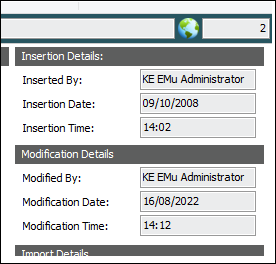
The Term Definition for the Dublin Core term dc:modified has a Term Format String of %sT%s-10:00 and takes data from the AdmDateModified and AdmTimeModified fields. Selecting the Preview button will show the following output:
Field Definition
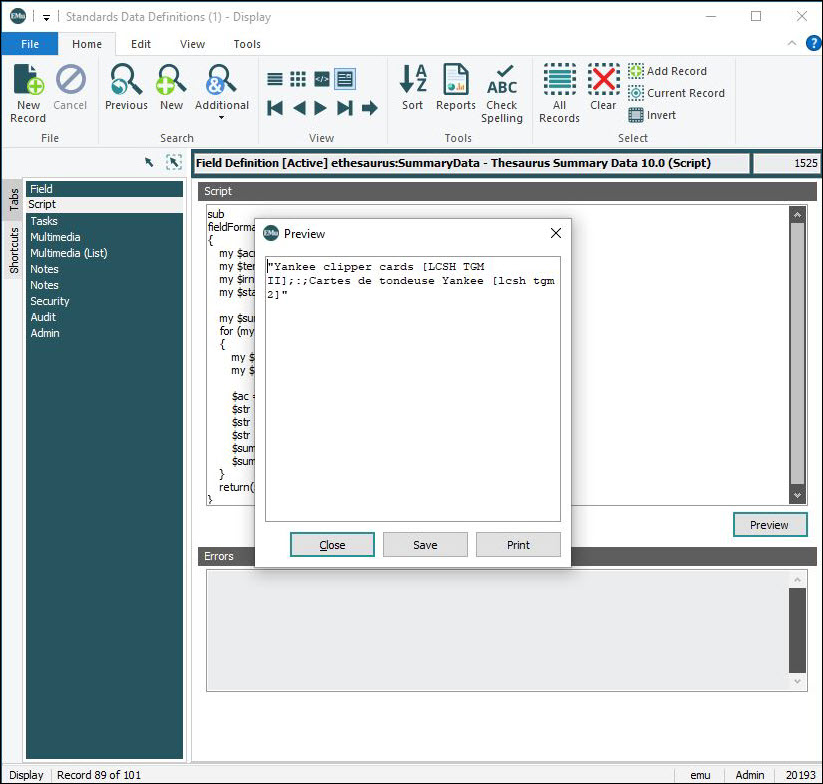
When defining a field on the Field tab in the Standards module we associate the field value with zero or more EMu fields and define how the field value is calculated. With the Preview Record Registry entry a Preview button is enabled on the Script tab. The button can be used to preview a Field Definition as it is created to ensure the calculated value matches what is expected.
When the Preview button is clicked, data from the specified record is retrieved and the script code for the current Field Definition is executed and the calculated value displayed in a popup window.
Usage
This Registry entry can be assigned to users and groups:
| Key | User | Group | Group |
|---|---|---|---|
| Key 1 | User
|
Group
|
Group
|
| Key 2 | user | group | Default
|
| Key 3 | Table
|
||
| Key 4 | estandards
|
||
| Key 5 | Preview Record
|
||
| Key 6 | Name | ||
| Value | irn | ||
In pipe-delimited format:
User
|
user | Table
|
estandards
|
Preview Record
|
Name | irn |
Group
|
group | Table
|
estandards
|
Preview Record
|
Name | irn |
Group
|
Default
|
Table
|
|
Preview Record
|
Name | irn |
where:
|
Name |
is the name of the standard or Field Definition for which the preview record is being set. Must match the name specified in Name: (Standard Name) when defining a Term Definition or Name: (Field Name) when defining a Field Definition in the Standards module. |
|
irn |
is the irn of a record to be used to preview the output of a Term Definition or Field Definition. The module holding the preview record must match the module named in Module: (Standard Name) when defining a Term Definition or Module: (Field Name) when defining a Field Definition. Only one record can be defined for each Name but it can be changed at any time to test different values for definitions if required. |
Example
The following Registry entry sets the Catalogue record with IRN 13692 as the preview record irn for group Ichthyology when testing the output of term definitions for the Darwin Core standard:
| Key | Setting |
|---|---|
| Key 1 | Group |
| Key 2 | Icthyology |
| Key 3 | Table |
| Key 4 | estandards |
| Key 5 | Preview Record |
| Key 6 | Darwin Core |
| Value | 13692 |